




This tip was sent to Tip of the Week email subscribers on January 22, 2015.

Sign up now and every week you’ll get a new InDesign Tip of the Week and Keyboard Shortcut of the Week, along with roundups of new articles at InDesignSecrets and CreativePro, plus exclusive deals sent right to your Inbox!
Just scroll all the way down to the bottom of this page, enter your email address, and click Go! We’ll take care of the rest. Now, on with the tip!
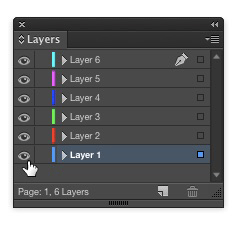
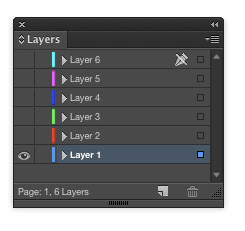
InDesign’s layers are great, but sometimes you can end up with so many layers that it gets confusing. To instantly hide all layers except one, hold the Option/Alt key and click the eye icon of the layer you want to remain visible.
This article was last modified on July 25, 2019
This article was first published on January 27, 2015
Commenting is easier and faster when you're logged in!

Recommended for you
How to Convert InDesign Layers to Photoshop Layers
Myra Ferguson shows you how to turn your multi-layered InDesign document into Ph...
Keep Footer Info Always Visible in InDesign
Keep your full-page photographs from blocking headers and footers in InDesign wi...

How to Import Images as Photoshop Layers
Load multiple image files as separate layers into a single Photoshop file!