




Diane wrote:
I have imported a Word doc into InDesign and had a glyph weirdness. When I chose Adobe Garamond Pro, all of my commas, periods and other punctuations turned into smaller and higher placed versions of themselves. But when I choose Garamond Premier Pro it doesn’t happen.
Floating punctuation is a classic problem having to do with the Fractions OpenType feature: When the Fractions feature is enabled, some OpenType fonts exhibit this behavior, and some don’t.
So check your paragraph style, your character style, or any local formatting that might be applied to the font. As we’ve said before we do not recommend leaving the Fraction feature on for all your text — just apply it to the text that really is a fraction. You can turn this on/off from the OpenType submenu, in the Character panel menu, or the Control panel menu:
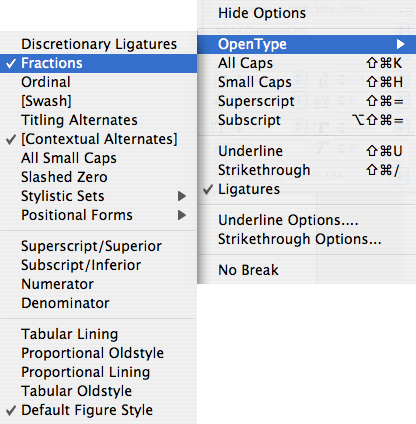
Also, check our Guide to OpenType Fractions for more information.
This article was last modified on December 18, 2021
This article was first published on September 19, 2007
Commenting is easier and faster when you're logged in!

Recommended for you

Livestream Video: Creating 3D Lettering Using Illustrator’s Inflate Tool
Join Khara Plicanic as she shows how to create stunning 3D lettering with Illust...

Quickly Renumber a List in InDesign
Khara Plicanic shows how to renumber an InDesign list without digging through me...
Review: Astute Manager Pro
This new service makes it easy to back up, restore, and sync your Illustrator se...