




Alien Skin‘s Snap Art is a plug-in for Photoshop, Lightroom, and Photoshop Elements that lets you apply art effects (including watercolor, oil paint, charcoal, pencil, and the new crayon) to photographs. Version 3 is now available, and it has several significant changes.
First, Alien Skin has revamped Snap Art’s interface so that you access all of it in one filter. That means no more repeat trips to Photoshop’s Filter menu when you want to change styles.
Version 3 also adds a detail mask so you can more carefully control where effects are applied. And speaking of control, Snap Art 3 is more precise overall; for example, improved stroke placement keeps edges sharp. The end result is greater realism, particularly when you’re working on photos of people.
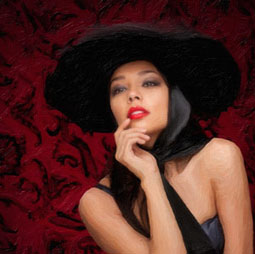
One of my favorite things about Snap Art is that it doesn’t destroy any pixels of the original image. Instead, all of its effects are on a separate layer.
Snap Art 3 costs $199; upgrades from versions 1 and 2 are $99. You can buy it here.
This article was last modified on December 14, 2022
This article was first published on July 20, 2011
Commenting is easier and faster when you're logged in!

Recommended for you

How to Adjust Colors in Photoshop Using Hue and Saturation
Learn how to manipulate an image’s colors using Photoshop’s Hue and Saturation s...

How to Turn a Photo into Graffiti in Photoshop
Create a spray-painted masterpiece in Photoshop with Steve Caplin.

Using Photoshop’s Generative Fill to Remove Objects
Learn how to simply remove items from an image in Photoshop, without extra conte...