




This tip was sent to Tip of the Week email subscribers on February 5, 2015.

Sign up now and every week you’ll get a new InDesign Tip of the Week and Keyboard Shortcut of the Week, along with roundups of new articles at InDesignSecrets and CreativePro, plus exclusive deals sent right to your Inbox!
Just scroll all the way down to the bottom of this page, enter your email address, and click Go! We’ll take care of the rest. Now, on with the tip!
Did you know that you can use InDesign’s Tabs panel for more than just working with tab stops? You can use it to adjust paragraph indents too.
Start by putting your cursor in a text frame, and in press Command+Shift+T/Ctrl+Shift+T to open the Tabs panel.
The controls for adjusting indents are the triangles on the sides of the ruler.
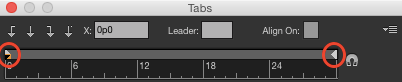
On the left are two tiny triangles stacked on top of one another. The top one controls the first line indent. The bottom one controls the left indent. You can tell which one you have selected by a highlight color.
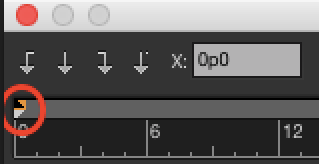
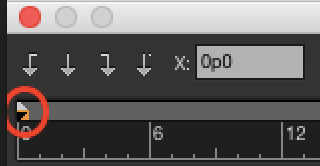
If you drag the bottom, you’ll move both triangles (and both the left and first line indents). If you drag the top, you’ll move just the first line indent. If you want to move the left indent independently, hold Shift as you drag the bottom triangle.
On the right side of the ruler is a single triangle you can click and drag to control the right indent.
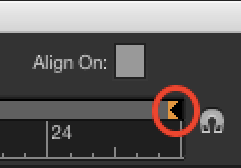
If you don’t see this triangle, click the magnet button or drag the right side of the Tabs panel to make it larger.
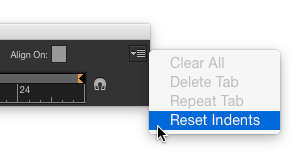
If you want to reset all indents to zero (left, right, and first line), go to the panel menu and choose Reset Indents.
This article was last modified on July 8, 2021
This article was first published on February 10, 2015
Commenting is easier and faster when you're logged in!

Recommended for you
Keep Footer Info Always Visible in InDesign
Keep your full-page photographs from blocking headers and footers in InDesign wi...
Tips to Control Photoshop Layers
Khara Plicanic shares smart Photoshop Layers panel tips to help you find and man...

Keynote: The Pro Design Powerhouse
Unlock type styles, photo adjustments, animation, and video capabilities that go...