


Painter How-to: Coloring Woodcuts

This story is taken from “The Painter 8 WOW! Book.”
Peachpit Press is offering this book to development.creativepro.com readers at a special discount. Click here to learn more.
Among the many artistic effects in Painter’s bag of tricks is the ability to add subtle coloration to ordinary drawings. One way to do so is shown here, where artist Chet Phillips transforms a black-and-white woodcut into a sepia-toned masterpiece.
The technique involves several steps — including turning black lines into brown strokes, converting white areas into transparent windows, and adding a textured background. Then Phillips uses Painter’s natural media tools — Nice Surface paper and Artists Pastel Chalk — to colorize the critters.
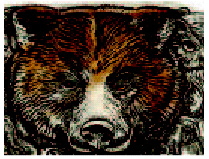
The result is a subtly toned, natural-looking woodcut worthy of hanging in an Adirondack Mountain lodge. Best of all, no chisels were required.
We’ve posted this excerpt as a PDF file. All you do is click this link “Coloring A Woodcut” to open the PDF file in your Web browser. You can also download the PDF to your machine for later viewing.
To open the PDF, you’ll need a full version of Adobe Acrobat (4 or higher) or the Adobe Reader, which you can download here:
 .
.
To learn how to configure your browser for viewing PDF files, see the Adobe Reader tech support page.
Excerpted from “The Painter 8 WOW! Book” © 2004 Cher Threinen-Pendarvis. Reproduced by permission of Pearson Education, Inc. Publishing as Peachpit Press. ALL RIGHTS RESERVED.
This article was last modified on March 15, 2022
This article was first published on November 19, 2003
Commenting is easier and faster when you're logged in!

Recommended for you

How to Turn a Photo into Graffiti in Photoshop
Create a spray-painted masterpiece in Photoshop with Steve Caplin.

How to Adjust Colors Using Photoshop’s Contextual Task Bar
Learn how to use the Photoshop Adjust Colors feature to make quick, non-destruct...

Using Photoshop’s Generative Fill to Remove Objects
Learn how to simply remove items from an image in Photoshop, without extra conte...