




In the latest episode of InDesign Secrets on lynda.com, Anne-Marie Concepción describes a terrible malady that has bedeviled some InDesign users for years. It’s called Live Preflight Blindness and it causes you to not notice InDesign’s Live Preflight feature working at the bottom of the document window to show you potential errors like missing links, broken URLs, missing fonts, etc.
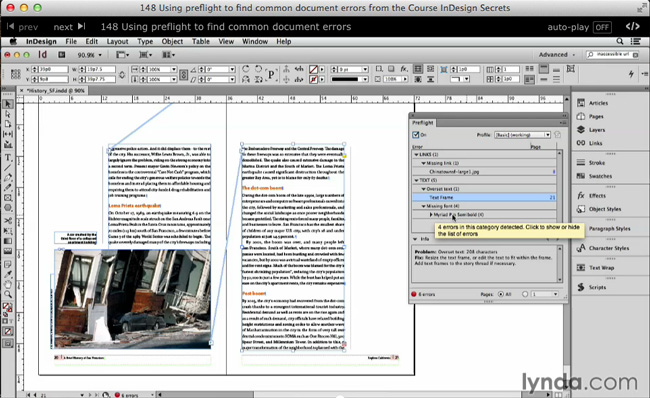
In the video, Anne-Marie shows a nifty shortcut to open the Preflight panel quickly, as well as how to use the panel to navigate to errors and view instructions for fixing them. And she also shows how to create your own simple custom preflight profiles that will flag the specific errors that cause you trouble.
Check it out now: Using Preflight to Find Common Document Errors.
This article was last modified on March 5, 2025
This article was first published on June 27, 2014
Commenting is easier and faster when you're logged in!

Recommended for you

Quick Wins: Building Print Production Skills
Use these five resources to boost your prepress knowledge and skills.
How to Find and Delete Production Notes in an InDesign Layout
Learn how to use InDesign’s Preflight feature to quickly find and flag productio...

Preflighting in InDesign and Adobe Acrobat
Creating documents that print smoothly and that look as good in print as they do...