




The Find/Change function is probably one of the most used features in all of InDesign. So everyone should know how to use it as quickly and efficiently as possible.
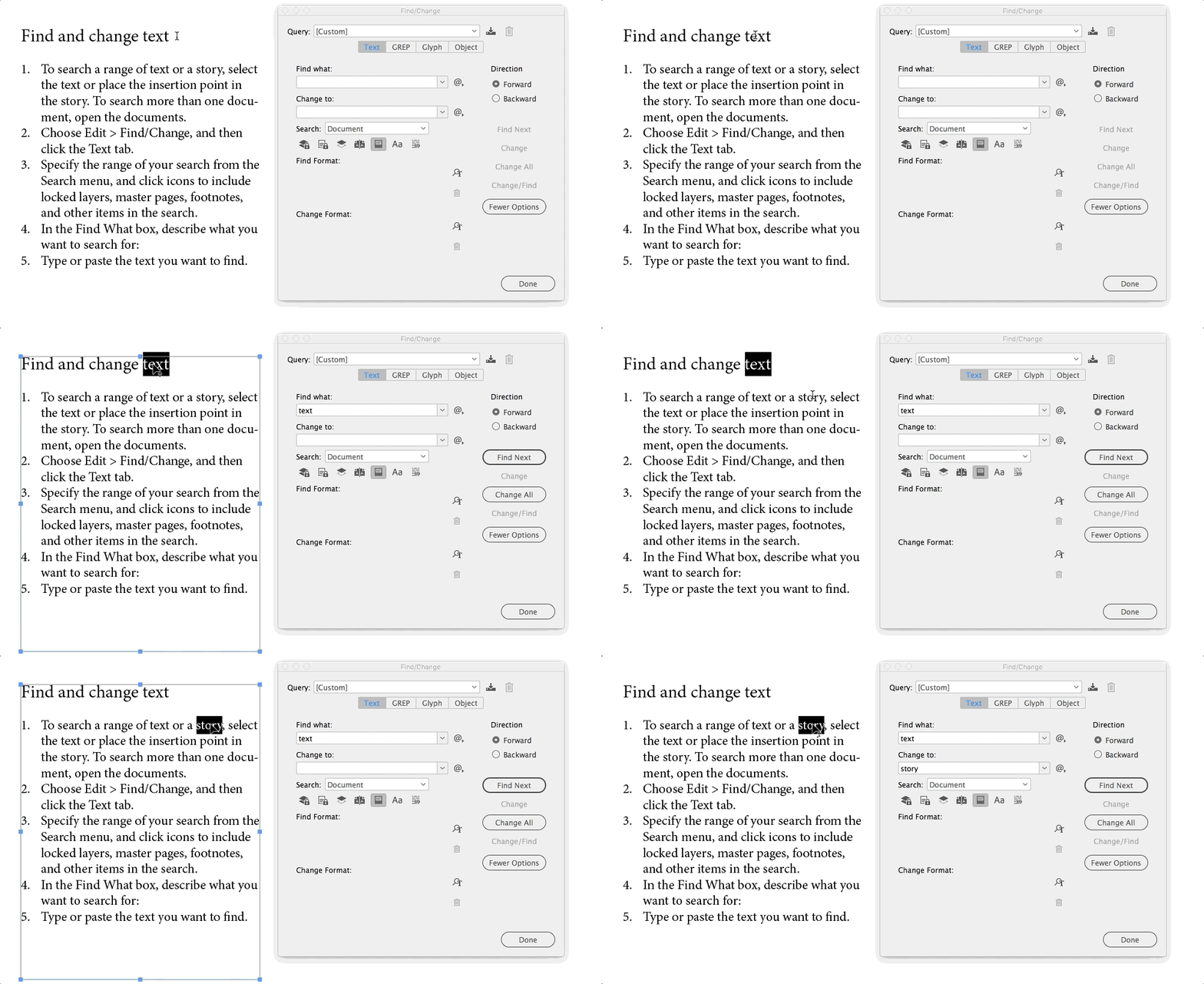
Most users open the Find/Change dialog and then type in what they need to find. But there is a convenient keyboard shortcut that autofills the “Find what:” field. Just select the word or phrase you want to find and press Command/Ctrl+F1. This way you not only save time but also prevent misspelling.
Likewise, you can select a word or phrase from your text and press Command/Ctrl+F2 to populate the “Change to:” field.
This article was last modified on July 7, 2021
This article was first published on February 2, 2019
Commenting is easier and faster when you're logged in!

Recommended for you

The 5 Rules of Efficiency for InDesign
You'll rake in the efficiency jackpot every time with these five basic rules.

10 Terrific Time Savers for InDesign
Life is busy. Work is hard. Use these tips to get more done faster.
How to Make Graphics Flow with Text in InDesign
Khara Plicanic demonstrates how to add a graphic between paragraphs so it flows...