




This InDesign tip was sent to Tip of the Week email subscribers on April 4, 2019.

Sign up now and every week you’ll get a new tip, keyboard shortcut, and roundups of new articles, plus exclusive deals sent right to your Inbox!
Just scroll down to the bottom of this page, enter your email address, and click Go! We’ll take care of the rest. Now, on with the tip!
Did you know that Word’s DOCX file format is a glorified ZIP file? Change the extension to ZIP, unzip it, and you’ll find all of the document’s original assets, including the images as individual files in a folder.
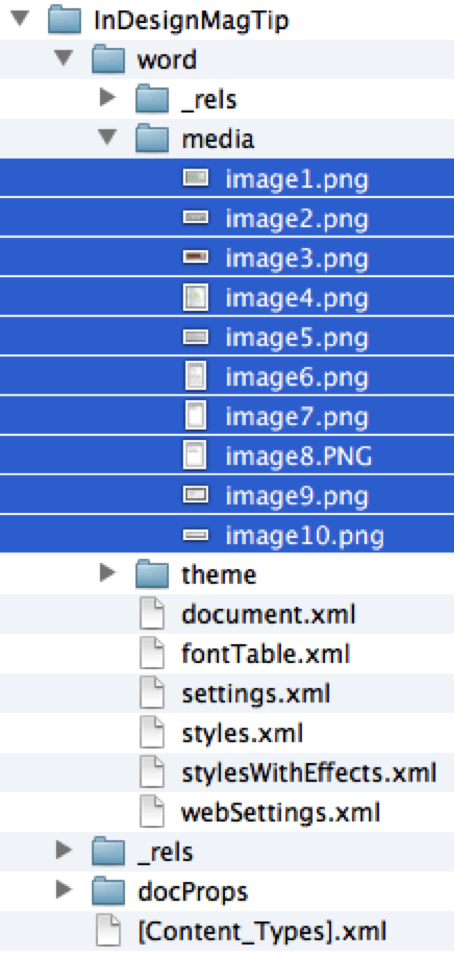
More importantly,InDesign can access the original high-resolution images when you place a DOCX file, even if they’re CMYK. The older DOC format converts all images to RGB PNG files.
This article was last modified on July 7, 2021
This article was first published on April 9, 2019
Commenting is easier and faster when you're logged in!

Recommended for you
Before&After: How to Design a Second Page
You've designed a beautiful outside. How do you follow it up inside? Simply.
How to Make Alternate Text Styles in Microsoft Word
Working in Microsoft Word? Shawn Jordison shows you how to spruce up your docume...
A Script to Remove Imported-Style Symbols in InDesign
When you place styled content from Microsoft Word into InDesign, the paragraph a...