

Here’s a terrific free script that you’re going to want to remember: The TimeChange script lets you add or subtract hours from the clock time in your document. For example, let’s say you have times throughout your document set like this: 5:30 pm, 12:15 pm, 1:45 am, and so on. Then you realize you need to switch to a different time zone, 3 hours behind. Run the script, choose -3 hours, and you’re done!
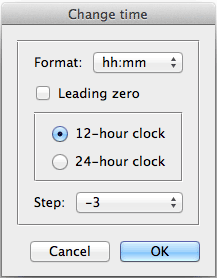
The script can handle 12- or 24-hour (military time) clock time, with either a colon or a dot delimiter. Pretty darn simple to use, but it took some real thinking to build behind the scenes. The mastermind is Peter Kahrel, who has given so many awesome scripts to the InDesign community. Thank you, Peter!
You can download the script here.
This article was last modified on December 21, 2021
This article was first published on September 23, 2012
Commenting is easier and faster when you're logged in!

Recommended for you
Create Flawless Fractions with OpenType
Choose your font carefully if you need flawless fractions!

Merge Ahead: Choosing the Right Tool for Variable Data Jobs
Which tool will smooth the road for the variable data that drives your customize...