




Press Release
Digital Film Tools, developer of visual effects software, announced the availability of PhotoCopy. The software creates a photographic reproduction of a printed or graphic work made with a process in which a new image is formed by the action of proprietary image analysis, color, texture and light. Whether it’s still or moving images, the key attributes are copied from one image and applied to another.
“Digital Film Tools painstakingly analyzed the brightness, color, tone, detail, grain and texture of some of the world’s greatest movies, paintings, photographs and historical photographic processes. The DNA of these masterpieces can now be applied to your very own images with PhotoCopy. The color, tone and brightness of the original work are replicated while the texture, grain and detail are simulated,” comments Marco Paolini, Founder and President, Digital Film Tools.
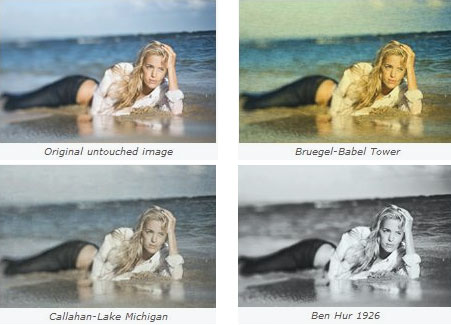
Photocopy makes any picture look interesting – feature highlights include;
* Pick from 94 Academy Award nominated movies including Apocalypse Now, Blade Runner, Frankenstein, Gone with the Wind, King Kong and The Lord of the Rings
* Choose from 72 paintings from artists such as Cezanne, Chagall, Greco, Leonardo, Monet, Rembrandt, Renoir and Van Gogh to name a few
* Select from 40 photographs by various masters of photography including Abbott, Andreev, Cunningham, Fenton, Nadar, Outerbridge, Stieglitz and Weston
* Try one of 30 historical processes, some of which are Ambrotype, Cyanotype, Liquid Emulsion, Kallitype, Palladium, Salt Print, Vandyke and Wet Plate
* Copy the key attributes from one image and apply them to another
* Create custom presets from your own images
* Color, tone and brightness replication
* Texture, grain and detail simulation
* Add a vignette to any preset
* Modify images with presets or sliders
* Quickly search for presets
Pricing and Availability:
PhotoCopy is available for download or purchase on the website at the following prices: Adobe After Effects, Apple Final Cut Pro, Avid Editing Systems – $195 (USD); Apple Aperture, Adobe Photoshop, Adobe Photoshop Elements, Adobe Photoshop Lightroom – $95.
This article was last modified on January 18, 2023
This article was first published on February 4, 2011
Commenting is easier and faster when you're logged in!

Recommended for you

How to Turn a Photo into Graffiti in Photoshop
Create a spray-painted masterpiece in Photoshop with Steve Caplin.

Using Photoshop’s Generative Fill to Remove Objects
Learn how to simply remove items from an image in Photoshop, without extra conte...

How to Adjust Colors in Photoshop Using Hue and Saturation
Learn how to manipulate an image’s colors using Photoshop’s Hue and Saturation s...