




It’s not hard to create dashed line effects in Photoshop. Just use one of the shape tools or the Line tool and apply a dashed stroke in the Options bar or Properties panel. 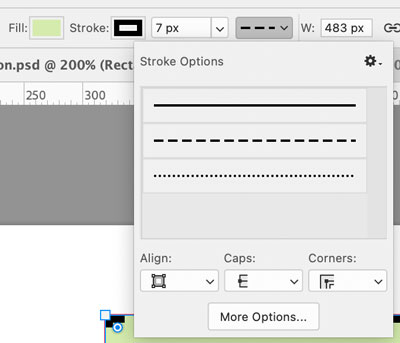 Click More Options to customize the stroke pattern and save it, if you wish.
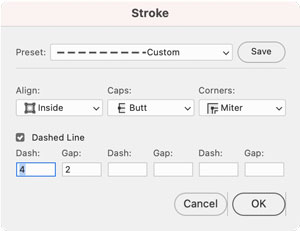 So far, so good. But you may run into difficulty if you have a shape with corners. Photoshop does not have a feature like InDesign and Illustrator do for automatically adjusting the dash pattern to make corners look consistent.
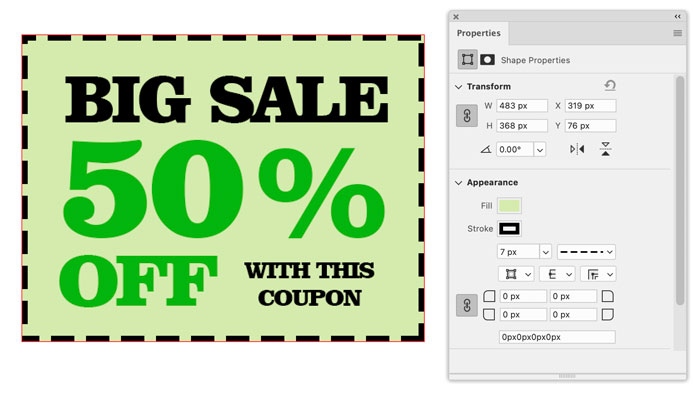
These are not the corners you’re looking for.

 And, in a very nice touch, the dialog box also includes an
Apply button so you can experiment with different values till you get the look you want. You can also simply re-run the script if you want to change the effect at any time after applying it. This script may be a decade old but it’s still quite useful and works like charm. Thanks, David!
Commenting is easier and faster when you're logged in!

Recommended for you

CreativePro Week 2026 Preview: 5 Pixel-Perfect Photoshop and Illustrator Sessions
Our Editor in Chief lists his must-see Photoshop and Illustrator sessions at Cre...
Using the Photo Restoration Neural Filter in Photoshop
This Neural Filter uses AI to remove scratches and other damage, and enhance fac...

Enlarging Images in Photoshop with AI Partner Models
A comparison of techniques for increasing the resolution of images with the help...
