




Our friend Rudi Warttmann originally wrote up this technique for the German-language Publishing Blog.ch. He graciously gave us permission to adapt his blog post (in English) here.
InDesign doesn’t provide a built-in way to search for tables within a document. However, since tables always are contained as inline graphics within a parent “character” of Unicode 0016, they can be found with a simple Find/Change. Just open the Find/Change dialog box, enter <0016> in the Find what field, and click the Find Next button.
Thanks for the great tip Rudi!
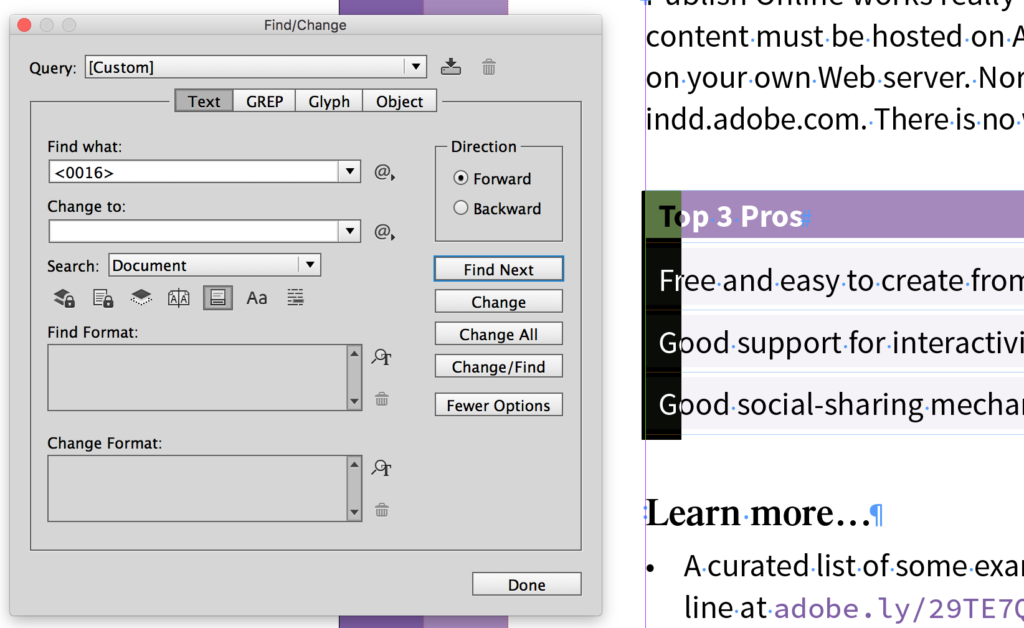
Find tables in InDesign
This article was last modified on July 25, 2019
This article was first published on March 2, 2017
Commenting is easier and faster when you're logged in!

Recommended for you
Quickly Create Text in an Arc or Circle in Photoshop
Khara Plicanic reveals new options in Photoshop for putting text in an arc or a...
How to Extract a Table from a PDF in Acrobat
Get your data out of a PDF and into an Excel Workbook with this quick Acrobat tr...

Livestream Video: Quick & Easy Vectors with Illustrator’s Shape Builder Tool
Join Khara Plicanic as she explores an easier way of drawing vector shapes in Il...