




Any time someone asks me what’s my favorite InDesign feature, I tell them without a doubt, it’s Quick Apply. It makes the job of applying styles to a large amount of text so much faster and easier, I can’t imagine going without it. Geeks be warned: the instant gratification you get with Quick Apply is positively addictive.
But styling text isn’t all that you can do with Quick Apply. It gives you near-instant access to just about anything in InDesign, as Anne-Marie Concepción shows in the latest InDesign Secrets video at lynda.com.
In the video, Anne-Marie demonstrates how to use Quick Apply instead of digging through menus and submenus to find the feature you’re looking for. It’s also great for accessing features that you only use once in a while that don’t have keyboard shortcuts (or have obscure shortcuts that are impossible to remember).
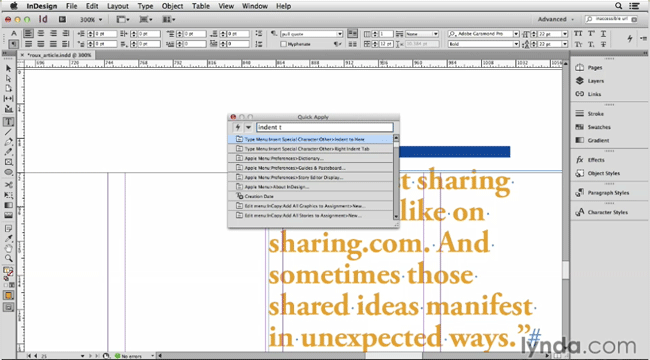
So check out the video and learn how to do just about anything in InDesign a little quicker.
This article was last modified on March 5, 2025
This article was first published on August 22, 2014
Commenting is easier and faster when you're logged in!

Recommended for you
How to Create Telephone Hyperlinks in InDesign
With a telephone hyperlink, you can make a phone call with a single click. Myra...

10 Terrific Time Savers for InDesign
Life is busy. Work is hard. Use these tips to get more done faster.
How to Find and Delete Production Notes in an InDesign Layout
Learn how to use InDesign’s Preflight feature to quickly find and flag productio...