


Select Body Parts and Clothing with One Click in Photoshop
Oops, you’re not logged in!
Login or sign up for a free account.
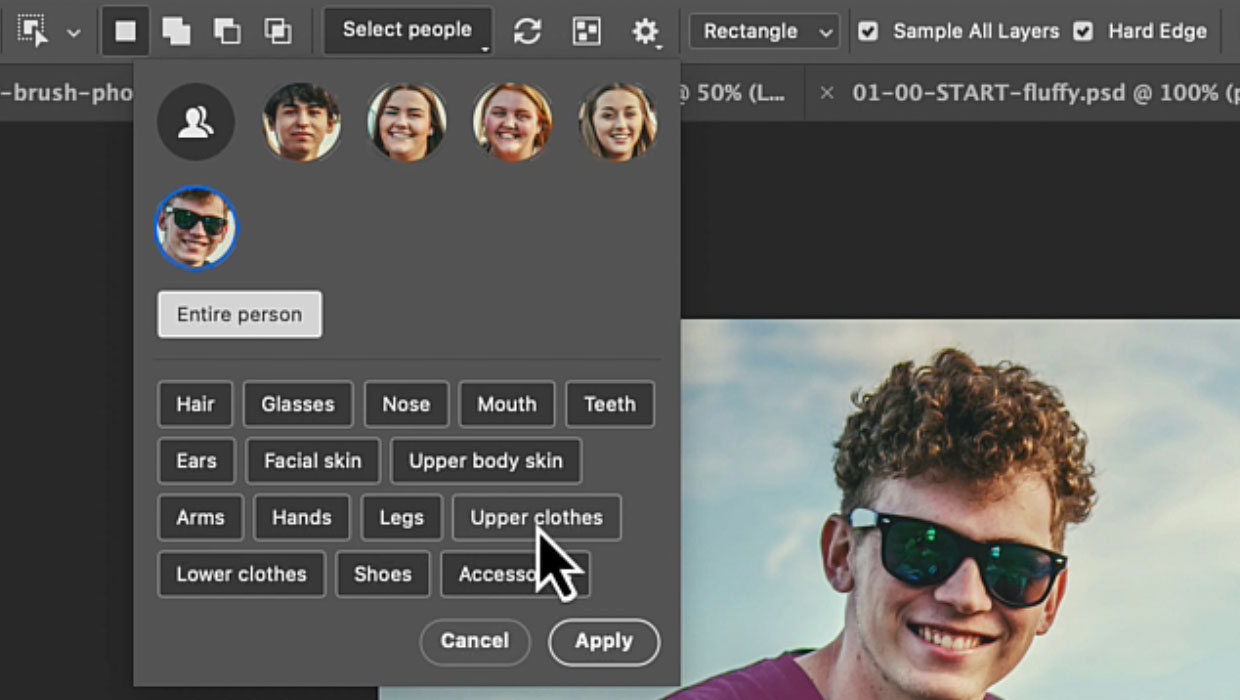
The Object Selection tool now includes a powerful Select People feature that is perfect for selecting people and all their details, such as clothing and body parts. Give it a try:
- Use the Object Selection tool on a photo with people.
- Click Select People in the Options bar.
- Choose Details to edit specific body parts or clothing items (Figure 1).

You can now do everything you would normally do with a selection. For instance, you can change the clothing with Generative Fill:
- Click a person in the Select People list, then select Upper Clothes.
- Click Apply, then extend the selection a bit in the Expand Selection dialog box (Select > Modify > Expand). You can start with 20px, but use a higher number when your image is larger.
- Use Generative Fill with a prompt like Green T-shirt to change colors instantly (Figure 2).

This workflow opens up endless possibilities for targeted adjustments without complex masking.
This article was last modified on November 3, 2025
This article was first published on October 1, 2025
Commenting is easier and faster when you're logged in!

Recommended for you
Review: Astute Manager Pro
This new service makes it easy to back up, restore, and sync your Illustrator se...

InDesign Can Create More Kinds of QR Codes Than You Think
With the right syntax, you can make QR codes that dial phone numbers, add calend...
Livestream Video: Creating 3D Lettering Using Illustrator’s Inflate Tool
Join Khara Plicanic as she shows how to create stunning 3D lettering with Illust...