




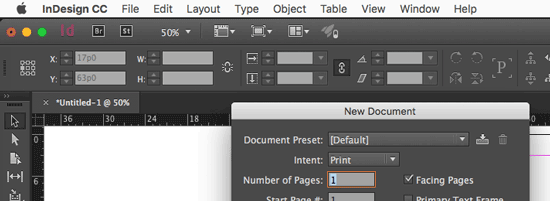
I’ve been having problems recently with InDesign disappearing. That is, I’ll switch to some other program (MS Word, or the Finder, or my email client), and when I switch back to InDesign… it’s gone! Well, most of it is gone… the menus are still there:

That is annoying, I can tell you! Note that I’m working on a Mac. I haven’t seen this on Windows.
So, in case this happens to you, let me share a few solutions I have found to work:
- First: don’t panic. InDesign is probably fine and this is likely just a screen redraw problem.
- Next, it only seems to happen to me when View > Application Frame is enabled. I almost always do work with the Application Frame on, but many people prefer it off. (Application Frame is a Mac-only feature.)
- I think, but am not sure, that this may happen more often when I’m using an external monitor.
- Toggling the Application Frame off and on again in the View menu seems to bring back InDesign.
- Similarly, opening any dialog box seems to “goose” the program into showing itself again. Even just pressing Cmd+N to open the New Document dialog box usually works for me:
Finally, if it keeps happening, quit and relaunch InDesign. That seems to clear up the problem for a while.
Has this happened to you? Any other solutions you have found to help?
This article was last modified on July 25, 2019
This article was first published on January 3, 2017
Commenting is easier and faster when you're logged in!

Recommended for you
Review: Astute Manager Pro
This new service makes it easy to back up, restore, and sync your Illustrator se...

Opinion: InDesign’s Auto-generate Alt Text Feature Needs to Change
How it might damage your accessibility workflow and how it can be fixed
How to Fix Missing Content Problems in Premiere
Learn what the media warnings in Premiere mean and how to address them