




This tip was sent to Tip of the Week email subscribers on January 15, 2015.

Sign up now and every week you’ll get a new InDesign Tip of the Week and Keyboard Shortcut of the Week, along with roundups of new articles at InDesignSecrets and CreativePro, plus exclusive deals sent right to your Inbox!
Just scroll all the way down to the bottom of this page, enter your email address, and click Go! We’ll take care of the rest. Now, on with the tip!
You can resize a table with the Type tool by dragging the right or bottom edge. But if you want to resize all the rows, hold down the Shift key while you drag the bottom edge.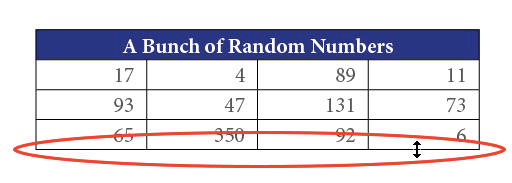
To resize all the columns proportionally, Shift-drag the right edge.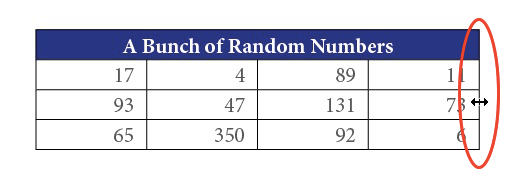
Or, to resize the table rows and heights at the same time, just drag the lower-right corner of the table with the Type tool.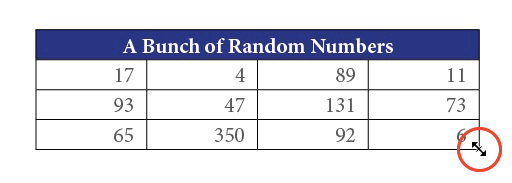
Note that resizing the table using these techniques does not scale the text in the table.
This article was last modified on July 25, 2019
This article was first published on January 20, 2015
Commenting is easier and faster when you're logged in!

Recommended for you
How to Extract a Table from a PDF in Acrobat
Get your data out of a PDF and into an Excel Workbook with this quick Acrobat tr...
Tips to Control Photoshop Layers
Khara Plicanic shares smart Photoshop Layers panel tips to help you find and man...

The 5 Rules of Efficiency for InDesign
You'll rake in the efficiency jackpot every time with these five basic rules.