



This CreativePro Tip of the Week on Making Dotted Lines in Illustrator was sent to CreativeProse email subscribers on October 18, 2017.
Sign up now and every week you’ll get a new tip, plus roundups of new articles, and exclusive deals sent right to your Inbox!
Just scroll down to the bottom of this page, enter your email address, and click Submit! We’ll take care of the rest. Now, on with the tip!
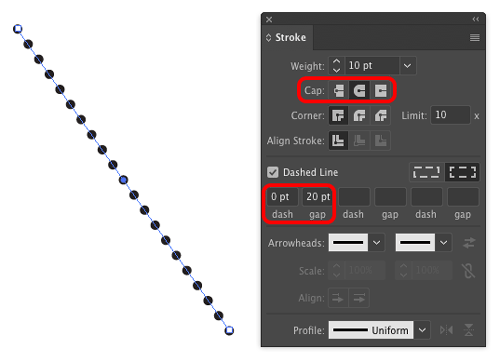
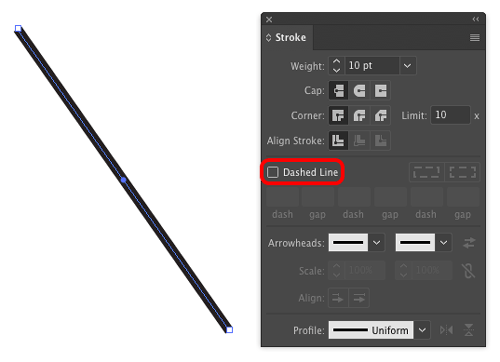
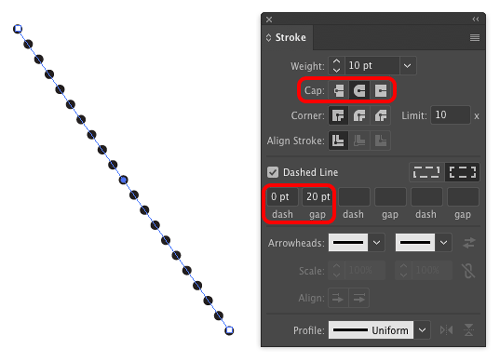
Need to make a dotted line in Illustrator? It’s not obvious how to do it. One way is to turn on the Dashed Line option in the the Stroke panel.
Then set the Cap to rounded, the Dash value to zero, and the gap to double the stroke width.
This article was last modified on December 7, 2017
This article was first published on December 7, 2017
Commenting is easier and faster when you're logged in!

Recommended for you
New Font Browser Features in Illustrator
Explore the new features added to the Font Browser in Illustrator 2026.
Tips to Control Photoshop Layers
Khara Plicanic shares smart Photoshop Layers panel tips to help you find and man...
Review: Astute Manager Pro
This new service makes it easy to back up, restore, and sync your Illustrator se...