




Sven wrote:
I’ve created a 20-page booklet that contains variable data, using Data Merge. When I merge the 65 records in, I get 1300 pages. I want to get 65 separate 20-page booklets instead.
As we’ve said before, Data Merge is not a very powerful system, and it sports a number of limitations. Fortunately, you can get it to break your documents up into smaller pieces — it’s just not immediately obvious how to do so.
The trick is to limit the number of records InDesign flows into a single document. Ordinarily, all the data records are flowed into a single document because there is no limit. But if you choose Create Merged Document, you can switch to the Options tab, and enable the Record Limit per Document field.
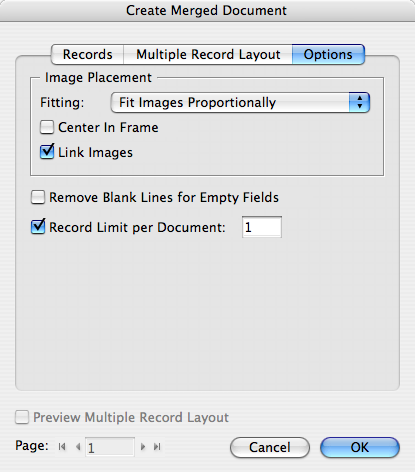
If you set the Limit to 1, then each record in the data file becomes its own InDesign file. In your case, you’d get 65 separate files.
Of course, the problem then is that you need to print each one separately. (If you were making booklets, you might use the Make Booklet feature.) I can’t think of any clever way to make a single 1300 page document and then make 65 booklets out of it automatically. Perhaps other folks know of scripts or software that can do this?
[Update: This is more possible with PDF. See this blog article.]
This article was last modified on December 19, 2021
This article was first published on July 22, 2008
Commenting is easier and faster when you're logged in!

Recommended for you
How to Export Videos in Different Aspect Ratios from Premiere
Quickly reframe your video for any social media platform with Myra Ferguson.
How to Create Kinetic Text in Keynote
It's a breeze to create custom typographic animations with Chris Converse.
How to Collapse All Layer Groups in Photoshop
Khara Plicanic shows how to manage your layer groups in Photoshop with one quick...