




Hey folks, it’s time for another InDesign mystery that you can solve for a chance to win an awesome prize!
Here’s the scenario:
You have a few paragraphs in a text frame with some empty space to the right of each paragraph.
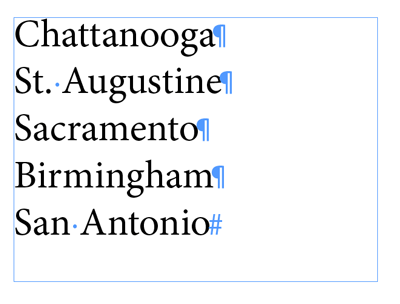
You take the Selection tool and drag the right side of the frame to reduce its width. But when you do, the lines of text all wrap and hyphenate, even though it clearly looks like there’s enough room to fit the text without wrapping.
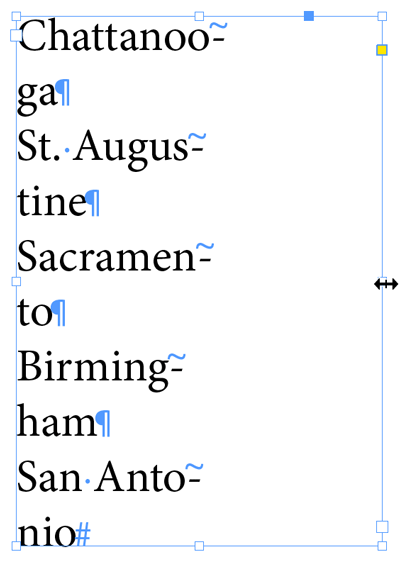
Why is the text doing this when it looks like it would fit without wrapping?
The prize is 3 months access to videos of any 2 days of CreativePro Week 2019!
The winner will be chosen at random from all the correct answers I receive before September 30, 2019
Enter now by emailing your solution to mike at indesignsecrets.com
Note: Comments are closed on this post so no one gives away the answer. Good luck!
This article was last modified on May 7, 2020
This article was first published on September 23, 2019
Commenting is easier and faster when you're logged in!

Recommended for you
How to Fix Missing Content Problems in Premiere
Learn what the media warnings in Premiere mean and how to address them

Interview with Nicte Cuevas, Brand Strategist and Designer
An award-winning strategist shares how personal resilience, cultural heritage, a...
Review: Astute Manager Pro
This new service makes it easy to back up, restore, and sync your Illustrator se...