




Adobe has released a new free extension for Photoshop CS6 that provides two new filters for smoothly blending between colors. The extension (currently available for Mac only) is called Interpolate and can be downloaded from Adobe Labs.
After you install the extension, you get two new menu items in the Filter menu: Interpolate and Match Edges
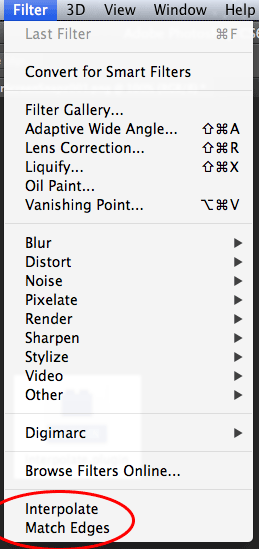
Acording to Adobe Labs, Interpolate fills the transparent areas of the current layer with a smooth mix of the colors in the opaque areas. Match Edges changes the colors at the edges of the current layer to match those of the layer below it, and smoothly distributes this change through the layer.
This article was last modified on September 19, 2012
This article was first published on September 19, 2012
Commenting is easier and faster when you're logged in!

Recommended for you

How to Adjust Colors in Photoshop Using Hue and Saturation
Learn how to manipulate an image’s colors using Photoshop’s Hue and Saturation s...

Using Photoshop’s Generative Fill to Remove Objects
Learn how to simply remove items from an image in Photoshop, without extra conte...

How to Turn a Photo into Graffiti in Photoshop
Create a spray-painted masterpiece in Photoshop with Steve Caplin.