




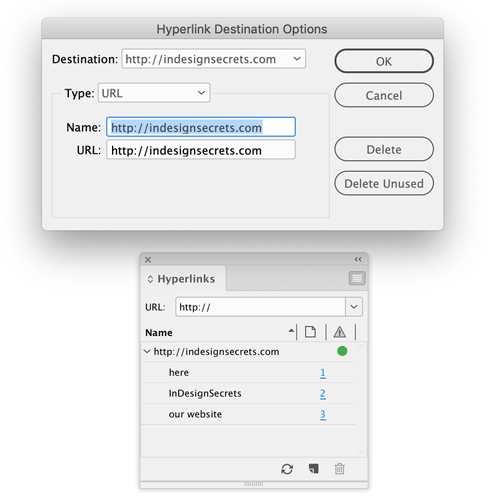
Need to edit several hyperlinks that all point to the same destination? You don’t have to fix them one by one. Just go to the Hyperlinks panel menu and choose Hyperlink Destination Options. In the dialog box, choose the destination you want to edit and update its name and/or URL. When you click OK all the hyperlinks that point to that destination will be updated.
This article was last modified on January 12, 2026
This article was first published on May 6, 2019
Commenting is easier and faster when you're logged in!

Recommended for you

How to Create Telephone Hyperlinks in InDesign
With a telephone hyperlink, you can make a phone call with a single click. Myra...

PageProof Introduces Automated Link Checking for Creative Approvals
PageProof’s link scanner surfaces URLs, internal jumps, and email links automati...

Adobe Unveils Major Expansion of Creative Agent Across Firefly and Creative Cloud Apps Including Photoshop and Premiere
Adobe is giving creative professionals an AI Assistant that orchestrates multi-s...