




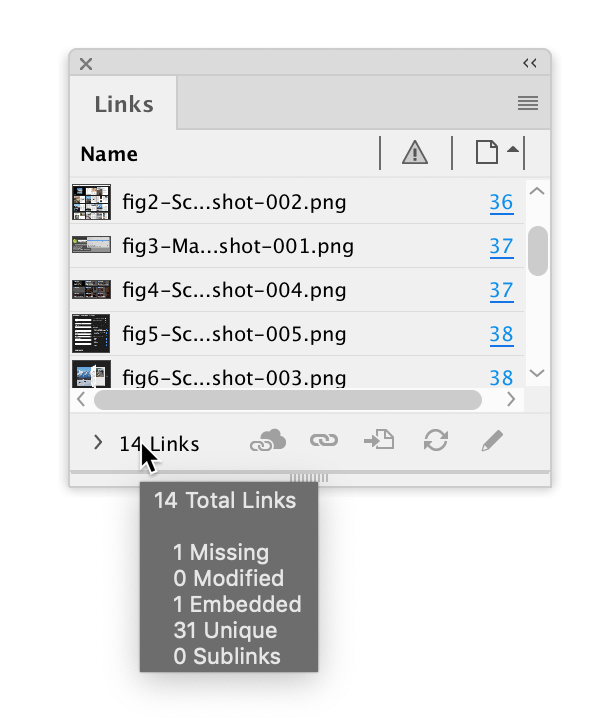
The Links panel is a great tool to review and manage all the placed links in your InDesign documents. But it’s not obvious how to get a quick summary of the status of your links. Sure you have Column and Link Info where you can set up different metadata and filter your images, but what if you just want a quick count of how many unique images you have in your document? Or how many missing, modified, or embedded images?
Just hover your cursor over the total link count on the left side of the Links panel and you get a pop-up that tells you exactly how many unique links there are in your document. It also shows you counts of missing, modified, embedded links. It will even tell you how many sublinks you have in your document (which are links in other .INDDs placed in your current document).
This article was last modified on August 30, 2021
This article was first published on August 29, 2021
Commenting is easier and faster when you're logged in!

Recommended for you

Before&After: How to Design a Second Page
You've designed a beautiful outside. How do you follow it up inside? Simply.

How to Create a Custom Stamp in Adobe Acrobat Pro
Learn how to move pages between PDF files with Chad Chelius.
Animate a Waterfall Effect on a PowerPoint Bar Chart
Stephy Hogan is back with another eye-catching animated chart design.