




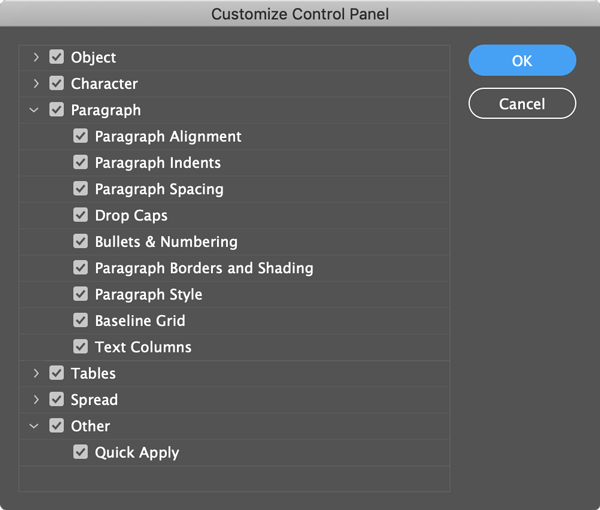
After the introduction of the Properties Panel in InDesign CC 2019 we have another context sensitive panel that shows many functions and options depending on which objects the user selects. So this might be a good time to free up some space in the good old Control Panel. In the top right corner just below the Search Field you will find a “cog wheel” that lets you access the customization of the Control Panel. It shows 6 categories:
- Object
- Character
- Paragraph
- Tables
- Spread
- Other
In every category you can choose from many options and tools that are shown or hidden in the Control Panel. Just tick or untick a box and you will can customized the Control Panel to your needs.
This article was last modified on June 28, 2023
This article was first published on March 4, 2019
Commenting is easier and faster when you're logged in!

Recommended for you

Quick Wins: Vector Drawing Skills
Use these five resources to boost your vector drawing skills.

How to Turn a Photo into Graffiti in Photoshop
Create a spray-painted masterpiece in Photoshop with Steve Caplin.
How to Create Kinetic Text in Keynote
It's a breeze to create custom typographic animations with Chris Converse.